[Skip to content](https://www.t-mobile.com/home-internet/the-signal/internet-connection/5g-home-internet-vs-mobile-hotspot-moving#maincontent)
[The Signal](https://www.t-mobile.com/home-internet/the-signal)
- [All Blogs](https://www.t-mobile.com/home-internet/the-signal/latest)
- [Speed](https://www.t-mobile.com/home-internet/the-signal/category/speed)
- [Internet Devices](https://www.t-mobile.com/home-internet/the-signal/category/internet-devices)
- [ISP](https://www.t-mobile.com/home-internet/the-signal/category/isp)
- [Internet Help](https://www.t-mobile.com/home-internet/the-signal/category/internet-help)
- [Dialed In](https://www.t-mobile.com/dialed-in/)
- [All Blogs](https://www.t-mobile.com/home-internet/the-signal/latest)
- [Speed](https://www.t-mobile.com/home-internet/the-signal/category/speed)
- [Internet Devices](https://www.t-mobile.com/home-internet/the-signal/category/internet-devices)
- [ISP](https://www.t-mobile.com/home-internet/the-signal/category/isp)
- [Internet Help](https://www.t-mobile.com/home-internet/the-signal/category/internet-help)
- [Dialed In](https://www.t-mobile.com/dialed-in/)
1. [The Signal](https://www.t-mobile.com/home-internet/the-signal) 2. Category:[Internet Connection](https://www.t-mobile.com/home-internet/the-signal/category/internet-connection) [Internet ConnectionCategory](https://www.t-mobile.com/home-internet/the-signal/category/internet-connection) # 5G Home Internet vs. Hotspot: What's Best for Home Internet When You Move? Published: May 6, 2026 |11 min read You've got boxes everywhere, keys to a new place, and a deadline to be online for work and streaming tonight. ¿Te das de alta enseguida en un servicio de Internet residencial o utilizas un hotspot móvil para ir solucionando mientras tanto? For many movers, this is the first internet decision you face-especially if you're unsure how long you'll stay or whether your current provider serves your new address. 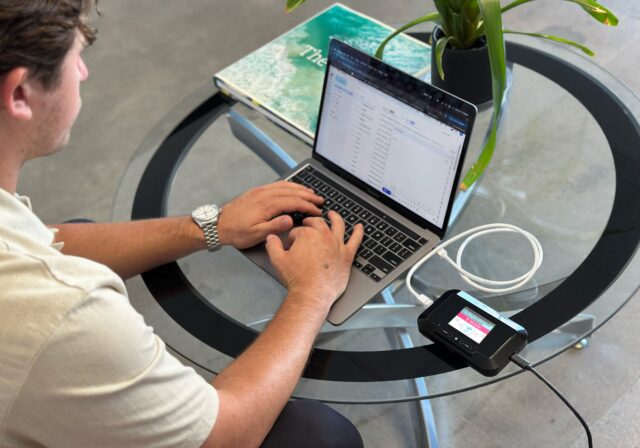 - Share "5G Home Internet vs. Hotspot: What's Best for Home Internet When You Move?" on X - Share "5G Home Internet vs. Hotspot: What's Best for Home Internet When You Move?" on Facebook - Share "5G Home Internet vs. Hotspot: What's Best for Home Internet When You Move?" on LinkedIn In this article, we unpack [5G home internet](https://www.t-mobile.com/home-internet) vs [mobile hotspot](https://www.t-mobile.com/hotspots-iot-connected-devices) so you can consider which is best for your upcoming move. Compararemos los planes de Internet 5G residencial y hotspot móvil en base a tres aspectos fundamentales: velocidad, confiabilidad y límites de datos, y costos, para que puedas decidir si confgurar una conexión 5G residencial exclusiva o recurrir a un hotspot temporalmente. Ambas opciones funcionan en redes celulares, pero cubren diferentes necesidades. We'll set expectations for short-term and long-term home use, explain when each shines, and point you to related moving resources on setting up internet, deciding to transfer vs start new service, and using a moving checklist to stay organized. ## Key takeaways - Use 5G home internet as your primary connection for multi-week stays and multi-user homes, and reserve a mobile hotspot for short-term moves or on-the-go backup. - Internet 5G residencial ofrece velocidades más constantes y una menor latencia para streaming, gaming y videollamadas que un teléfono o un hotspot móvil exclusivo, que varía más según la fuerza de la señal y la congestión de la red. - For regular streaming and work, a 5G home internet plan costs less overall than buying premium-priced, capped hotspot data that can throttle after allowances. ## What is 5G home internet? [5G home internet](https://www.t-mobile.com/home-internet/the-signal/internet-devices/what-is-5g-gateway) is a form of fixed wireless access. En lugar de instalar un cable o una conexión de fibra óptica en tu casa, el proveedor proporciona un receptor o enrutador 5G especializado que se conecta a la torre celular 5G más cercana y luego distribuye la señal wifi a tus dispositivos. The basic setup is simple: [5G tower](https://www.t-mobile.com/dialed-in/wireless/what-is-a-cell-tower) → indoor (or window) receiver/router → your home Wi-Fi. Because the equipment is designed for in-home use, it can maintain a steadier signal than a phone and support many devices at once. El rendimiento real varía según la ubicación y la red, pero muchos planes de Internet 5G residencial ofrecen velocidades de descarga de aproximadamente 100 a 300 Mbps, velocidades de carga de 10 a 30 Mbps y una latencia que suele situarse en el rango de ~20-50 ms. Esas cifras son competitivas frente a muchos planes de cable para necesidades cotidianas como streaming, videollamadas, descargas de archivos de gran tamaño y copias de seguridad en la nube. La disponibilidad es mayor en las zonas urbanas y en muchas áreas suburbanas donde la cobertura 5G es amplia; el acceso en zonas rurales está en expansión, pero es más variable. For movers, the appeal is speed to install-self-setup in minutes with no technician visit-and the ability to transfer service easily if your new address is covered. ## How does a mobile hotspot work? A [mobile hotspot](https://www.t-mobile.com/home-internet/the-signal/internet-devices/what-is-portable-wifi) shares a cellular data connection with other devices over Wi-Fi. You can create a hotspot from your smartphone (tethering) or use a dedicated hotspot device with its own SIM and battery. En términos técnicos, tu teléfono o hotspot convierte una señal celular 4G LTE o 5G en una pequeña red wifi local a la que pueden conectarse laptops, tablets y televisores. Se activa rápidamente y funciona en cualquier lugar donde tengas cobertura celular. El uso compartido de datos de smartphones es una alternativa conveniente, pero consume la batería rápidamente y puede recalentar el dispositivo; además, muchos proveedores tienen límites de datos para hotspot separados de los datos de uso en el teléfono. Los dispositivos de hotspot especializados suelen tener capacidad para más usuarios, ofrecen mejores antenas y se mantienen enchufados, pero sus planes de datos normalmente son limitados. Hotspots shine for temporary, [travel](https://www.t-mobile.com/home-internet/the-signal/internet-devices/rv-internet-take-connectivity-along-for-the-ride), or backup use. Como conexión principal de Internet residencial, el rendimiento puede variar en función de la intensidad de la señal y la congestión de la torre, y los límites de datos pueden reducir las velocidades una vez utilizada la asignación. Security-wise, a personal hotspot with a strong password (WPA2/WPA3) is much safer than public Wi-Fi. ## 5G internet vs mobile hotspot at a glance Here's a quick snapshot to help movers see which fits their situation before diving deeper. | Factor | Internet 5G residencial | Hotspot móvil | |-----------------------------|----------------------------------------------------------------|------------------------------------------------------------------------------| | Caso de uso principal | Conexión residencial principal para usar durante varias semanas, meses o más tiempo | Conexión temporal o portátil; buena alternativa de respaldo | | Configuración | Enrutador 5G para autoinstalación; wifi en toda la casa | Se debe activar el uso compartido de datos en el teléfono o usar un hotspot especializado | | Velocidades típicas | ~100-300 Mbps de bajada; 10-30 Mbps de subida (según la ubicación) | 4G: ~10-50 Mbps; 5G: ~50-150+ Mbps (muy variable) | | Latencia típica | ~20-50 ms (más constante) | ~30-80+ ms; varía según la señal y la congestión | | Política de datos | Asignaciones ilimitadas o altas con gestión de red | Datos para hotspot generalmente con ciertos límites; reducción de velocidades o rebaja de prioridad después del límite | | Confiabilidad | Equipo fijo optimizado para una señal estable en el hogar | Mayor fluctuación por movimiento, paredes y la carga de la torre | | Transferencia de número | Se puede trasladar entre direcciones cubiertas | Ultraportátil; funciona en cualquier lugar donde haya cobertura | | Dispositivoss compatibles | Todo el grupo familiar (docenas de dispositivos) | Limitado (normalmente entre 5 y 15 para teléfonos; más para hotspots especializados) | | Recomendado durante una mudanza | Se configura rápidamente en un lugar nuevo; buena opción para varios usuarios | Conectividad temporal, para viajes y de respaldo | | Costos | Generalmente un cargo mensual fijo | Puede ser un cargo mensual fijo o cobrarse por gigabyte | | Datos incluidos | Suelen ser ilimitados o muy elevados con gestión de red | Datos de alta velocidad, normalmente con ciertos límites, y reducción de velocidades o rebaja de prioridad después del límite | | Reducción de velocidades o rebaja de prioridad | Menos común para el uso normal; se puede gestionar si hay congestión | Común después de usar la asignación de alta velocidad | | Equipos | Enrutador o receptor 5G residencial; autoinstalación | Teléfono (consumo de la batería) o dispositivo de hotspot especializado | | Costo efectivo por GB | Bajo para un uso moderado a considerable (cientos de GB) | Alto para un uso moderado a considerable; económico solo para un uso ligero | | Ideal para el nivel de uso | Moderado a considerable, hogares con varios usuarios | Uso ligero, estadías a corto plazo, viajes y respaldo | ## Speed and latency [Speed](https://www.t-mobile.com/home-internet/the-signal/speed/what-internet-speed-do-i-need) is how fast you can download or upload data; [latency](https://www.t-mobile.com/home-internet/the-signal/speed/what-is-latency) is the response time between your device and the network. Para el uso diario, Internet 5G residencial suele ofrecer velocidades de descarga de entre 100 y 300 Mbps, con una latencia de aproximadamente 20 a 50 ms. Un hotspot 5G a veces puede alcanzar velocidades comparables a las anunciadas, pero su estabilidad depende en gran medida de la intensidad de la señal y la congestión de la torre. Los hotspots 4G LTE suelen ofrecer velocidades más bajas y una latencia más alta. Por qué la latencia es importante: cuanto más bajos sean los valores, más fluida será la experiencia con tareas en tiempo real. Video calls remain stable with consistent sub-50 ms latency; [online gaming](https://www.t-mobile.com/home-internet/the-signal/speed/the-internet-speed-you-need-for-gaming) feels more responsive with steady pings under ~40 ms. Streaming is more sensitive to sustained throughput than latency, but big fluctuations can cause buffering-an area where fixed 5G home setups often hold steadier than phone-based hotspots. Las mediciones habituales sitúan la latencia diaria de las redes 5G en aproximadamente entre 20 y 40 ms, mientras que en las redes 4G LTE suele oscilar entre 30 y 60 ms o más bajo carga. That gap can be the difference between a crisp video call and a choppy one when networks are busy. ## Reliability, data caps, and throttling Fixed 5G home internet equipment is designed to lock onto a strong signal and distribute it across your home with robust Wi-Fi, which helps maintain steady speeds during busy hours. Los hotspots fluctúan más. Mover el teléfono por el apartamento, agregar paredes entre el dispositivo y la torre o conectarte a un sector de la red congestionado puede reducir considerablemente la velocidad y aumentar la latencia. No hay problema si son solo unos días, pero puede resultar frustrante para el uso residencial a largo plazo. Las políticas de datos son el principal diferenciador. Muchos planes de Internet 5G residencial son prácticamente ilimitados (sujetos a la gestión de red), mientras que los planes de hotspot suelen incluir una asignación de alta velocidad con límite. Una vez que se agota esa asignación para hotspot, las velocidades se pueden reducir drásticamente o el tráfico puede tener menor prioridad. For movers, the impact shows up quickly: a family streaming HD video, gaming, and joining video calls can chew through hotspot allowances in days, triggering throttling and evening slowdowns just when everyone's online. ## Costs considerations __Costs hinge on two things:__ whether your plan is truly unlimited and how much you pay per gigabyte. 5G home internet typically offers a flat monthly price for heavy use, while hotspot data is priced at a premium and often capped-making it affordable for light, short-term use but costly for sustained home connectivity. ## Which option makes sense when you're moving? Usa esta guía rápida para tomar una decisión y elegir la configuración indicada para tu mudanza. Los ejemplos ayudan a aclarar las diferencias: un subarrendamiento a corto plazo (2 a 4 semanas) o una estadía de hotel es ideal para usar un hotspot. Para un arrendamiento de varios meses, un empleo nuevo con videollamadas diarias o un grupo familiar con varias personas que hacen streaming, el servicio de Internet 5G residencial podría ser mejor. ¿Estás esperando que te conecten el servicio por cable? Un hotspot móvil puede ayudarte por unos días. Si la espera se prolonga más de una semana o dos, o si varias personas necesitan una conexión confiable, el servicio de Internet 5G residencial es la opción más sólida como puente, ya que puede seguir siendo tu conexión principal incluso después de que cambien los plazos de instalación. Las personas que se mudan con frecuencia y los inquilinos pueden beneficiarse con los equipos listos para usar del servicio de Internet 5G residencial y la autoinstalación sencilla. If your provider offers [coverage at the new address](https://www.t-mobile.com/home-internet/eligibility), transferring 5G home internet can be simpler than cancelling and starting over (many large carriers, including Verizon, support address checks and transfers). Common questions to consider during a move: 1. __How long will you be there?__ For very short stays, a hotspot may be enough. Si necesitas una conexión a Internet más constante, parecida a una conexión doméstica, el servicio de Internet 5G residencial suele ser mejor, y puede ser una buena opción para probar si no sabes exactamente lo que necesitarás a largo plazo.
2. __How many people/devices are in your home?__ One light user can manage on a hotspot; multiple users or smart TVs favor 5G home internet.
3. __What do you do online?__ Daily video calls, cloud work, gaming, or 4K streaming push you toward 5G home internet.
4. __Is your address covered?__ Check coverage at the new address. Si el servicio de Internet 5G residencial está disponible, es una buena opción de rápida instalación; de lo contrario, puedes comenzar con un hotspot. 5. __What fits your budget?__ Calculate the real cost. Compara un plan de Internet 5G residencial con tarifa fija con el costo por GB de las asignaciones para hotspot que consumirías. 6. __What gear do you have?__ If you already own a dedicated hotspot, it's a good short-term bridge; otherwise, the 5G home router can replace stopgap gear and support the whole home. ## FAQs about 5G internet vs. hot spots __Is 5G home internet better than using my phone as a hotspot?__ For most movers and multi-user homes, yes. 5G home internet typically provides steadier speeds, lower latency, and no or higher data caps, while phone hotspots fluctuate more and often have limited high-speed data. __Can a mobile hotspot replace home internet long-term?__ It can for very light, single-user needs, but most households will hit hotspot data caps and see variable performance. For multi-week or multi-user home use, 5G home internet is the more reliable primary connection. __How do speeds compare between 5G home internet and hotspots?__ 5G home internet commonly runs ~100-300 Mbps down with ~20-50 ms latency. 5G hotspots can be fast but vary more; 4G hotspots are usually ~10-50 Mbps with higher latency. __Which costs less for typical home use: 5G home internet or a hotspot?__ 5G home internet. Hotspot data is priced at a premium per GB and often throttles after a cap, making sustained streaming and WFH more expensive than a flat-rate 5G home plan. __What happens if I hit my hotspot data cap?__ Your hotspot traffic may be throttled to low speeds (often 1-3 Mbps) or deprioritized during congestion until your next bill cycle or until you purchase more hotspot data. __What's the difference between 5G home internet and a 5G hotspot if both use cellular networks?__ The key difference is the equipment and intended use. 5G home internet uses a dedicated router designed to stay in one place and support many devices. A mobile hotspot-whether on your phone or a separate device-is built for portability and lighter, temporary use. __Is a mobile hotspot fast enough for video calls and remote work?__ It can be, especially on a strong 5G signal. Sin embargo, la velocidad y la latencia pueden variar más que en una conexión fija de 5G residencial. If your job depends on stable video meetings or large file uploads, a dedicated 5G home router typically delivers more consistent performance. __Is a dedicated hotspot device better than phone tethering?__ For longer sessions, yes. Dedicated hotspot devices usually support more connected devices, have stronger antennas, and can stay plugged in. Phone tethering is convenient but can overheat your phone and reduce battery health over time. __Which is cheaper during a move: 5G home internet or a hotspot?__ For light use over a few days, a hotspot you already have may cost nothing extra. For multi-week or heavy use, a flat-rate 5G home internet plan is often more cost-effective than paying for large amounts of premium hotspot data. __Can I connect smart home devices to a hotspot?__ Technically, yes-but it's not ideal long term. Los dispositivos domésticos inteligentes, como cámaras, bocinas y termostatos, funcionan de forma más fiable con un enrutador doméstico estable. A 5G home internet setup is better suited for supporting dozens of connected devices at once. __You might also be interested in:__ - [What is Portable Wi-Fi? How to Set It Up, How it Works, the Benefits & More](https://www.t-mobile.com/home-internet/the-signal/internet-devices/what-is-portable-wifi)
- [What Is A 5G Gateway?](https://www.t-mobile.com/home-internet/the-signal/internet-devices/what-is-5g-gateway)
- [What Internet Speed Do I Need?](https://www.t-mobile.com/home-internet/the-signal/speed/what-internet-speed-do-i-need)
- [5G Home Internet Plans](https://www.t-mobile.com/home-internet)
- [Hotspot Plans](https://www.t-mobile.com/cell-phone-plans/affordable-data-plans/hotspots)
Sources:
- [https://www.cnet.com/home/internet/can-my-mobile-hotspot-be-better-than-my-home-internet/](https://www.cnet.com/home/internet/can-my-mobile-hotspot-be-better-than-my-home-internet/)
- [https://epb.com/get-connected/tech-support/can-5g-hotspot-replace-home-internet/](https://epb.com/get-connected/tech-support/can-5g-hotspot-replace-home-internet/) Tags - [Compare](https://www.t-mobile.com/home-internet/the-signal/archive/compare) - [Gateway](https://www.t-mobile.com/home-internet/the-signal/archive/gateway) - [Latency](https://www.t-mobile.com/home-internet/the-signal/archive/latency) - [Router](https://www.t-mobile.com/home-internet/the-signal/archive/router) - [Technology](https://www.t-mobile.com/home-internet/the-signal/archive/technology) ## Related Articles NEW [Read More](https://www.t-mobile.com/home-internet/the-signal/internet-devices/do-you-need-mesh-wi-fi) [](https://www.t-mobile.com/home-internet/the-signal/internet-devices/do-you-need-mesh-wi-fi) [Internet Devices](https://www.t-mobile.com/home-internet/the-signal/category/internet-devices) ## [When You Actually Need Mesh Wi-Fi and When You May Not](https://www.t-mobile.com/home-internet/the-signal/internet-devices/do-you-need-mesh-wi-fi) September 9, 2026 NEW [Read More](https://www.t-mobile.com/home-internet/the-signal/internet-devices/smart-home-devices-for-beginners) [](https://www.t-mobile.com/home-internet/the-signal/internet-devices/smart-home-devices-for-beginners) [Internet Devices](https://www.t-mobile.com/home-internet/the-signal/category/internet-devices) ## [Smart Home Devices for Beginners: A 2026 Starter Guide](https://www.t-mobile.com/home-internet/the-signal/internet-devices/smart-home-devices-for-beginners) August 18, 2026 NEW [Read More](https://www.t-mobile.com/home-internet/the-signal/internet-devices/what-is-fixed-wireless-internet) [](https://www.t-mobile.com/home-internet/the-signal/internet-devices/what-is-fixed-wireless-internet) [Internet Devices](https://www.t-mobile.com/home-internet/the-signal/category/internet-devices) ## [What is Fixed Wireless Internet? A Guide to Fixed Wireless Access](https://www.t-mobile.com/home-internet/the-signal/internet-devices/what-is-fixed-wireless-internet) August 4, 2026 ### Find out if your home address is eligible for T-Mobile 5G Home Internet. [Check availability](https://www.t-mobile.com/home-internet/eligibility) Top