- [Asistencia](https://es.t-mobile.com/support)
- [Comienza](#)
- [¿Acabas de unirte a T-Mobile?](https://es.t-mobile.com/support/new-to-tmobile)
[Cambiarse es fácil](https://es.t-mobile.com/support/new-to-tmobile/family-freedom)
[Configura tu dispositivo](https://es.t-mobile.com/support/new-to-tmobile/device)
[Cómo usar la app](https://es.t-mobile.com/support/plans-features/t-mobile-app)
[Todo sobre cómo comenzar](https://es.t-mobile.com/support/new-to-tmobile)
- [Recursos de la cuenta](#)
- [Formas de pagar tu factura](https://es.t-mobile.com/support/account/pay-your-bill)
[Todo acerca de tu factura](https://es.t-mobile.com/support/account/whats-impacting-your-bill)
[Permisos de la línea](https://es.t-mobile.com/support/account/set-online-permissions)
[Tu T-Mobile ID](https://es.t-mobile.com/support/account/set-up-and-manage-your-t-mobile-id)
[Tu PIN/código de acceso](https://es.t-mobile.com/support/account/update-your-customer-pinpasscode)
[Todo sobre recursos de la
cuenta](https://es.t-mobile.com/support/account)
- [Red y roaming](#)
- [Red de T-Mobile](https://es.t-mobile.com/support/coverage/t-mobile-network)
[Mensajes y wifi en los vuelos](https://es.t-mobile.com/support/coverage/t-mobile-in-flight-texting-and-wi-fi)
[Llamadas wifi](https://es.t-mobile.com/support/coverage/wi-fi-calling-from-t-mobile)
[Roaming internacional](https://es.t-mobile.com/support/coverage/international-roaming-services)
[Mobile Without Borders](https://es.t-mobile.com/support/coverage/mobile-without-borders)
[Todo sobre red y roaming](https://es.t-mobile.com/support/coverage)
- [Asistencia de planes](#)
- [Encuentra el plan ideal](https://es.t-mobile.com/support/plans-features/find-the-right-plan-for-you)
[Netflix por cuenta nuestra](https://es.t-mobile.com/support/plans-features/netflix-on-us)
[Planes hotspot](https://es.t-mobile.com/support/plans-features/mobile-internet-plans-for-hotspots)
[Correo de voz](https://es.t-mobile.com/support/plans-features/voicemail)
[Usa el Hotspot móvil](https://es.t-mobile.com/support/plans-features/smartphone-mobile-hotspot-wi-fi-sharing--tethering)
[Todo sobre asistencia de planes](https://es.t-mobile.com/support/plans-features)
- [Asistencia de dispositivo](#)
- [Tutoriales](https://es.t-mobile.com/support/tutorials)
[Resolución de problemas](https://es.t-mobile.com/support/phones-tablets-devices/troubleshooting)
[Desbloquear tu dispositivo](https://es.t-mobile.com/support/devices/unlock-your-mobile-wireless-device)
[Protege tu dispositivo](https://es.t-mobile.com/support/devices/protectionandlt360andgt-and-device-protection)
[Tarjeta SIM e eSIM](https://es.t-mobile.com/support/devices/sim-esim)
[Asistencia para dispositivos](https://es.t-mobile.com/support/phones-tablets-devices)
- [Asistencia para empresas](#)
- [Obtén T-Mobile para Empresas](https://es.t-mobile.com/support/business/new-to-business)
[Facturación y pagos](https://es.t-mobile.com/support/business/billing)
[Administra tu cuenta](https://es.t-mobile.com/support/business/account)
[Pedidos y compras](https://es.t-mobile.com/support/business/orders-shopping)
[Regístrate en Account Hub](https://es.t-mobile.com/support/business/account-hub-registration)
[Todo sobre asistencia
para empresas](https://es.t-mobile.com/support/business)
[ASISTENCIA](https://es.t-mobile.com/support)
- [Comienza](#)
- [¿Acabas de unirte a T-Mobile?](https://es.t-mobile.com/support/new-to-tmobile)
- [Cambiarse es fácil](https://es.t-mobile.com/support/new-to-tmobile/family-freedom)
- [Configura tu dispositivo](https://es.t-mobile.com/support/new-to-tmobile/device)
- [Cómo usar la app](https://es.t-mobile.com/support/plans-features/t-mobile-app)
- [Todo sobre cómo comenzar](https://es.t-mobile.com/support/new-to-tmobile)
- [Recursos de la cuenta](#)
- [Formas de pagar tu factura](https://es.t-mobile.com/support/account/pay-your-bill)
- [Todo acerca de tu factura](https://es.t-mobile.com/support/account/whats-impacting-your-bill)
- [Permisos de la línea](https://es.t-mobile.com/support/account/set-online-permissions)
- [Tu T-Mobile ID](https://es.t-mobile.com/support/account/set-up-and-manage-your-t-mobile-id)
- [Tu PIN/código de acceso](https://es.t-mobile.com/support/account/update-your-customer-pinpasscode)
- [Todo sobre recursos de la
cuenta](https://es.t-mobile.com/support/account)
- [Red y roaming](#)
- [Red de T-Mobile](https://es.t-mobile.com/support/coverage/t-mobile-network)
- [Mensajes y wifi en los vuelos](https://es.t-mobile.com/support/coverage/t-mobile-in-flight-texting-and-wi-fi)
- [Llamadas wifi](https://es.t-mobile.com/support/coverage/wi-fi-calling-from-t-mobile)
- [Roaming internacional](https://es.t-mobile.com/support/coverage/international-roaming-services)
- [Mobile Without Borders](https://es.t-mobile.com/support/coverage/mobile-without-borders)
- [Todo sobre red y roaming](https://es.t-mobile.com/support/coverage)
- [Asistencia de planes](#)
- [Encuentra el plan ideal](https://es.t-mobile.com/support/plans-features/find-the-right-plan-for-you)
- [Netflix por cuenta nuestra](https://es.t-mobile.com/support/plans-features/netflix-on-us)
- [Planes hotspot](https://es.t-mobile.com/support/plans-features/mobile-internet-plans-for-hotspots)
- [Correo de voz](https://es.t-mobile.com/support/plans-features/voicemail)
- [Usa el Hotspot móvil](https://es.t-mobile.com/support/plans-features/smartphone-mobile-hotspot-wi-fi-sharing--tethering)
- [Todo sobre asistencia de planes](https://es.t-mobile.com/support/plans-features)
- [Asistencia de dispositivo](#)
- [Tutoriales](https://es.t-mobile.com/support/tutorials)
- [Resolución de problemas](https://es.t-mobile.com/support/phones-tablets-devices/troubleshooting)
- [Desbloquear tu dispositivo](https://es.t-mobile.com/support/devices/unlock-your-mobile-wireless-device)
- [Protege tu dispositivo](https://es.t-mobile.com/support/devices/protectionandlt360andgt-and-device-protection)
- [Tarjeta SIM e eSIM](https://es.t-mobile.com/support/devices/sim-esim)
- [Asistencia para dispositivos](https://es.t-mobile.com/support/phones-tablets-devices)
- [Asistencia para empresas](#)
- [Obtén T-Mobile para Empresas](https://es.t-mobile.com/support/business/new-to-business)
- [Facturación y pagos](https://es.t-mobile.com/support/business/billing)
- [Administra tu cuenta](https://es.t-mobile.com/support/business/account)
- [Pedidos y compras](https://es.t-mobile.com/support/business/orders-shopping)
- [Regístrate en Account Hub](https://es.t-mobile.com/support/business/account-hub-registration)
- [Todo sobre asistencia
para empresas](https://es.t-mobile.com/support/business)
[Asistencia](https://es.t-mobile.com/support/) [T-Mobile Para Empresas](https://es.t-mobile.com/support/community/business)
# 5G Signal Spot
0
Added!
[](https://es.t-mobile.com)
### Administrar enlaces
Haz clic en cualquier [available links](https://es.t-mobile.com) to add.
Haz clic en cualquier [added links](https://es.t-mobile.com) to remove.
Enlaces con [no highlight](https://es.t-mobile.com) can't be sent.
Listo (0 Links)
El 5G Signal Spot es la solución comercial de T-Mobile para proporcionar cobertura 5G en interiores a clientes empresariales. Ofrece hasta 25,000 pies cuadrados de cobertura 5G por unidad utilizando tu conexión de banda ancha actual.
__En esta página:__
- [Imágenes del dispositivo](https://es.t-mobile.com#device)
- [Especificaciones técnicas](https://es.t-mobile.com#tech)
- [Configuración](https://es.t-mobile.com#setup)
- [Actualizar la dirección de uso (E911)](https://es.t-mobile.com#e911)
- [Indicadores LED y puertos](https://es.t-mobile.com#led)
- [Resolución de problemas](https://es.t-mobile.com#troubleshooting)
### [](https://es.t-mobile.com)Imágenes del dispositivo
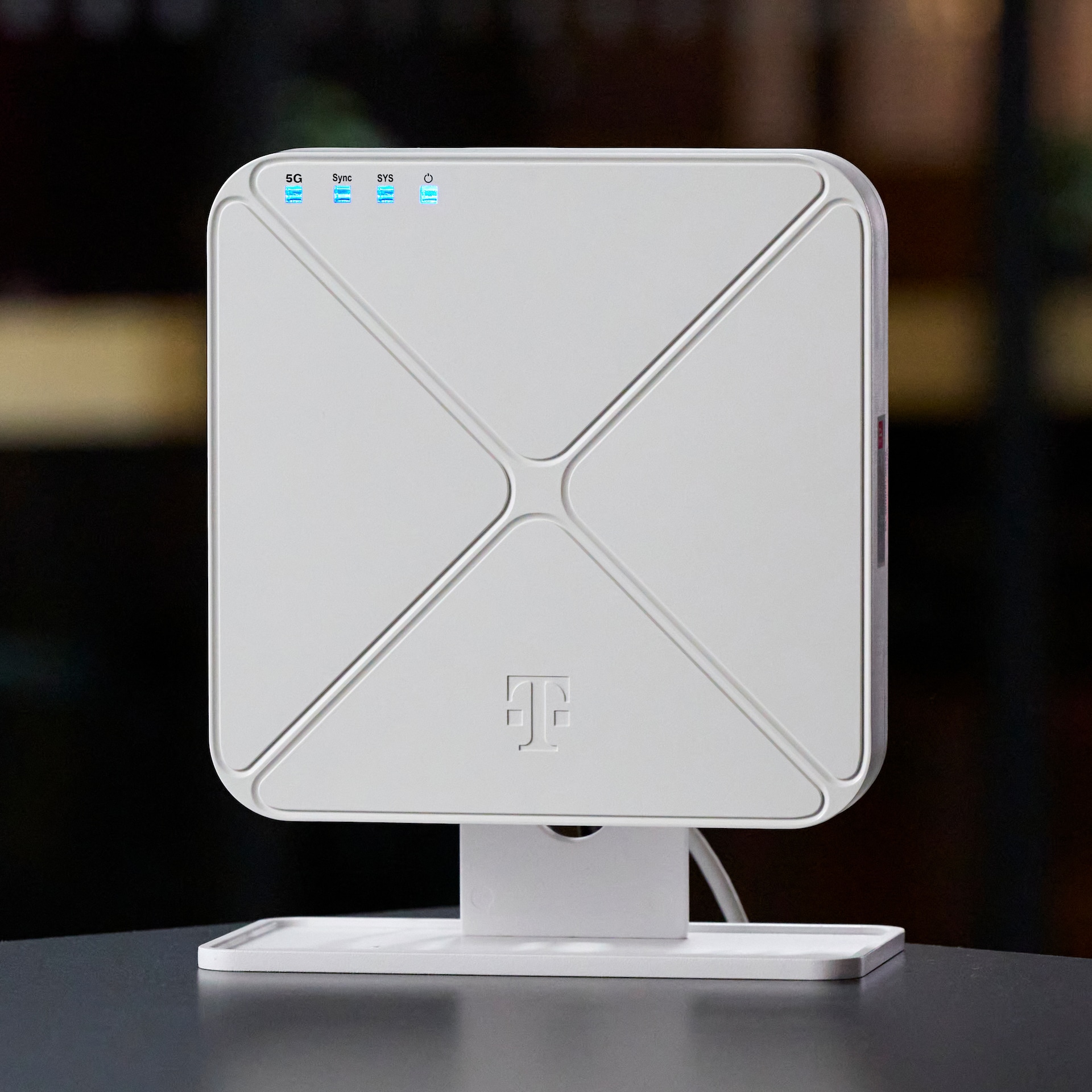
Frente
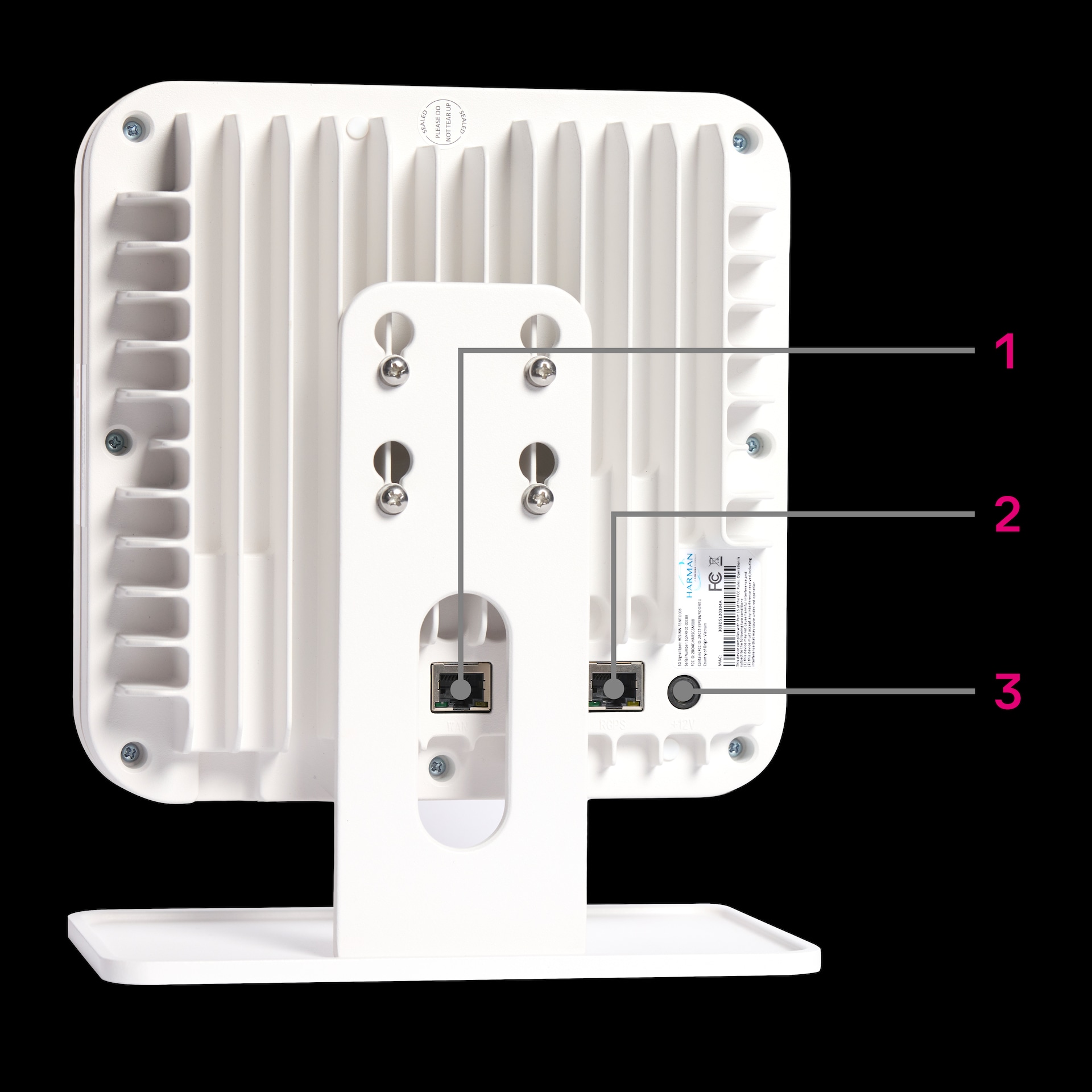
Atrás
### [](https://es.t-mobile.com)Especificaciones técnicas
__Tema__ __Detalles__
Adaptador de potencia
Adaptador de CA de 12 V/10 A
IEEE 802.3bt Tipo 4 PoE++ (37V-57V)
Dimensiones (al. x an. x pr.)
7.87” x 7.87” x 2.52” (200 x 200 x 64 mm)
Peso: 53 oz (1503 g)
Rango de temperatura de funcionamiento
14 °F a 104 °F (-10 °C a 40 °C)
PLMNID (Identificador de red pública de comunicaciones móviles terrestres)
310-260
Conectividad de red
5G SA
Banda
N41 (2.5 GHz)
### [](https://es.t-mobile.com)Configuración
¿El video no carga? __Vuelve a cargar esta página__ e inténtalo nuevamente.
1. Conecta el cable Cat5e/Cat6 incluido al puerto __WAN__ del 5G Signal Spot y conecta el otro extremo a tu enrutador o conmutador de banda ancha. Tu conexión debe admitir velocidades Gigabit; se requiere un mínimo de 200 Mbps dedicados por unidad (se recomiendan 1 Gbps).
2. Conecta la antena RGPS al puerto __RGPS__ y colócala cerca de una ventana o en cualquier lugar con una vista despejada y sin obstáculos del cielo.
3. Enchufa el dispositivo usando el adaptador de CA de __12 V/10 A__ incluido (conéctalo al puerto de CA) o una fuente __PoE++__ (IEEE 802.3bt Tipo 4). Se necesita solo una fuente de alimentación.
4. El dispositivo comienza automáticamente el proceso de configuración y establece un túnel IPSec seguro con el núcleo de red 5G de T-Mobile. __La configuración inicial y el registro en la red pueden tardar entre 20 y 30 minutos__. Los cuatro LED se iluminarán de color azul fijo cuando el dispositivo esté listo.
Requisitos de backhaul y puertos
Las conexiones de banda ancha con velocidad reducida provocarán una disminución del rendimiento en las unidades.
- Se necesita una conexión de banda ancha de al menos 200 Mbps dedicada a cada unidad. Para la mayoría de las instalaciones, se recomienda una conexión de 1 Gbps dedicada a cada unidad.
- El enrutador debe permitir tráfico saliente en los puertos.
- Siempre que sea posible, hay que activar UPnP en el enrutador.
- Se establece un túnel IPSec seguro con el núcleo de red 5G de T-Mobile para garantizar la conectividad del servicio.
Requisitos de puertos del cortafuegos
| __Port Number (Número de transferencia)__ | __UDP/TCP__ | __Uso__ |
|-------------------------------------------|-------------|------------------------------------------------------------------------------------|
| 123 | UDP | Comunicaciones seguras HTTPS/TLS |
| 208.54.0.0/16 | UDP/TCP | Rango de direcciones IP de destino incluidas en la lista de permitidas de T-Mobile |
| 500 | UDP | Túnel IPSec |
| 4500 | UDP/TCP | Túnel seguro encapsulado/transporte propio |
### [](https://es.t-mobile.com)Actualizar la dirección de uso (E911)
El 5G Signal Spot debe registrarse en la ubicación donde está instalado para cumplir con la normativa sobre E911. Actualiza la dirección antes de mudarte a tu nueva casa para que no se interrumpa el servicio.
1. Inicia sesión en [T-Platform](https://es.t-mobile.com/t-platform) y actualiza la dirección.
2. Una vez actualizada, enciende el dispositivo o reinícialo (desenchúfalo durante un minuto y vuelve a enchufarlo).
3. Espera entre 15 y 20 minutos a que los cambios de dirección se propaguen y vuelve a registrarte en la red.
### [](https://es.t-mobile.com)Indicadores LED y puertos
Indicadores LED
En la parte frontal del dispositivo hay cuatro LED indicadores de estado. Cuando los 4 están en azul fijo, el Signal Spot está funcionando y transmitiendo 5G. Los LED rojos o intermitentes indican un problema que hay que revisar.
| __LED__ | __Qué monitorea__ | __Estado normal__ |
|---------------|--------------------------------------------------|--------------------------|
| Encendido | Alimentación del dispositivo y estado de PoE | Azul fijo |
| Sistema (SYS) | Estado general del sistema | Azul fijo |
| Sync (Sinc) | Sincronización y hora GPS | GPS con señal (azul) |
| 5G | Conectividad de backhaul y compatibilidad con 5G | Conectado a 5G SA (azul) |
Puertos
| __Port Number (Número de transferencia)__ | __Etiqueta del puerto__ | __Objetivo__ |
|-------------------------------------------|-------------------------|--------------------------------------------------------------------------------------------------------------------------------------------------------------------|
| 1 | WAN/PoE++ | Conexión de Ethernet a tu enrutador o conmutador. También es compatible con PoE++ (IEEE 802, tipo 4, 100W) para el suministro de energía a través del mismo cable. |
| 2 | RGPS | Conexión para antena GPS externa para la sincronización horaria mediante satélites. |
| 3 | Alimentación por CA | Conexión del adaptador de corriente alterna de 12 V/10 A. Solo se necesita una fuente de alimentación (CA o PoE++). |
### [](https://es.t-mobile.com)Resolución de problemas
#### Configuración
- __No hay ningún LED encendido:__ comprueba la fuente de alimentación (adaptador de CA o PoE++) y prueba con un enchufe o un puerto de conmutador que sepas que funciona.
- __El LED de sincronización permanece rojo durante más de 20 minutos:__ cambia la antena GPS a una ubicación mejor.
- __El LED 5G está en rojo o intermitente durante más de 30 minutos:__ comprueba la conexión Ethernet y asegúrate de que los puertos necesarios estén abiertos.
- __Todos los LED están en azul, pero el rendimiento es bajo:__ comprueba el ancho de banda disponible del proveedor de Internet y reduce la carga de la red local.
- __Si todos los LED están en rojo intermitente o el problema persiste:__ [contáctanos](https://es.t-mobile.com/contact-us).
* * *
¿Te fue útil?
* * *
## Obtén respuestas de nuestros Expertos en T-Mobile para empresas, las 24 horas, los 7 días de la semana.
- [1-800-375-1126](tel:18003751126)
- [@TMobileBusiness](https://twitter.com/TMobileBusiness)
- [T-Mobile para empresas](https://www.facebook.com/TMobileforBusiness)